Anthropic Computer Use API in Production Workflows
Claude's computer use tool now meets human-level accuracy and exits beta support.
Anthropic's Computer Use API left beta on August 19, 2026, almost exactly two years after its October 2024 debut. The browser use tool, the Files API, and the Skills API all crossed the same finish line on the same day, so the four pieces of Anthropic's agent stack are now sold, supported, and priced as one integrated system rather than four experiments running on separate clocks.
Calling this a two-year beta undersells what actually happened during that stretch. A model that scored 22% on OSWorld at launch, low enough that most engineering teams would have shelved the whole idea, now clears human baseline performance on the successor benchmark. The GA label is a signal that the failure modes that made computer use unsafe to run against production systems in 2024 have been measured, tracked, and mostly closed. It's a signal that the failure modes that made computer use unsafe to run against production systems in 2024 have been measured, tracked, and mostly closed.
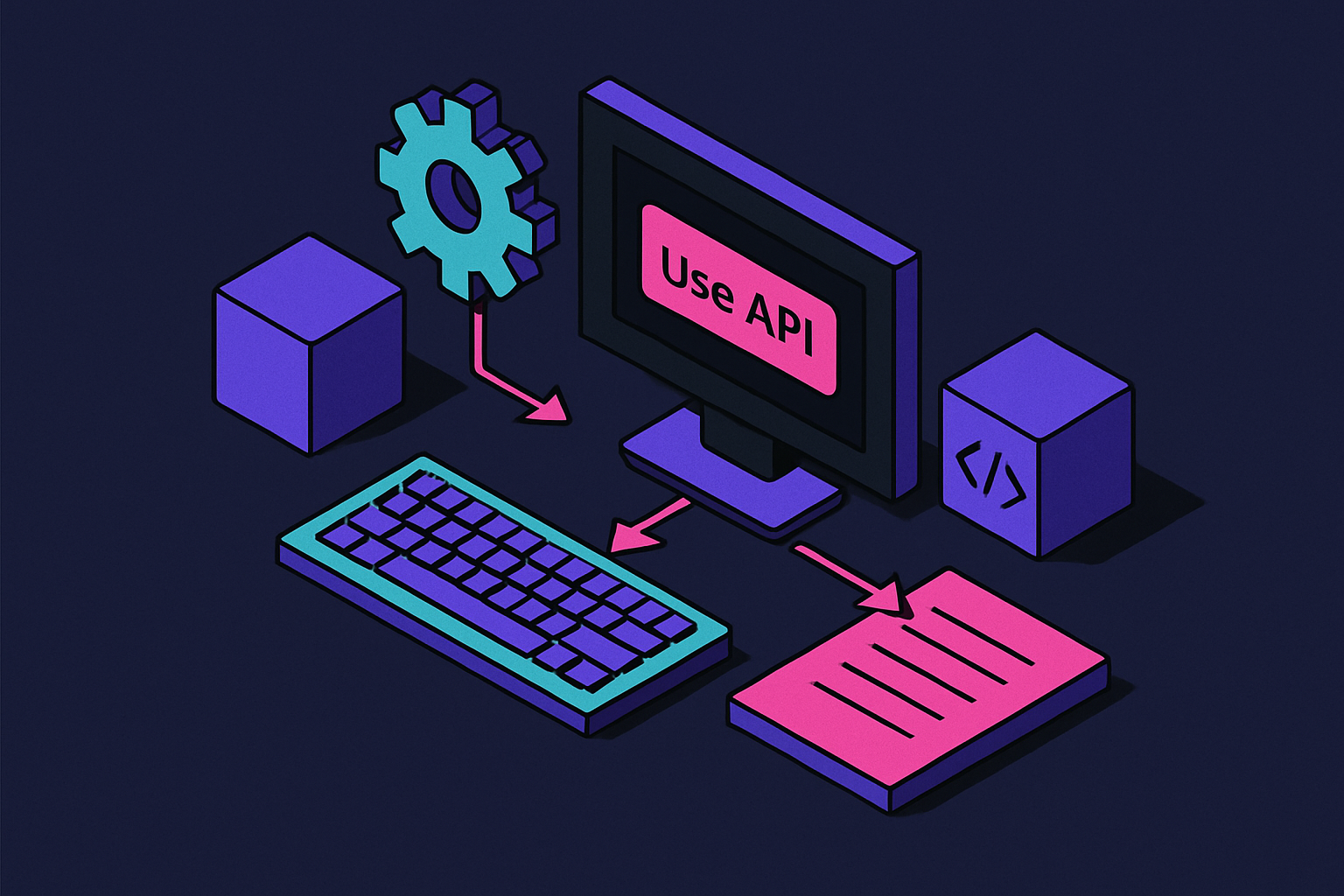
For developers already running the older integration path, nothing breaks. Anyone using the anthropic-beta: computer-use-2025-11-24 header against Claude 4.x models, including claude-sonnet-4-6, keeps working during migration. But new builds should target the GA toolset identifier directly: computer_toolset_20260801, dropped into the tools array with no beta header. That's the whole difference, procedurally. Everywhere else in this piece covers the substance of that difference.
How computer use works at the infrastructure level
When the branding is stripped away, computer use is a loop, repeated as many times as the task needs. Claude receives a screenshot, reasons over what's visible on screen, dispatches an action, receives a fresh screenshot showing the result, and judges its progress. Then it does it again. Each turn begins from the latest screenshot, giving the model a fresh view of the current state of the screen.
Three primitives carry out whatever Claude decides to do. The computer tool handles mouse and keyboard input, expressed as pixel coordinates. The bash tool runs system-level commands. The text_editor tool reads and writes files directly. Together they cover most of what a human does at a desktop: click something, type something, run something, edit something.
Coordinate mapping is where a lot of production deployments quietly break. Claude returns coordinates based on the screenshot it was shown, and if the calling application resizes that screenshot before display, or scales it for a high-DPI monitor, those coordinates no longer line up with the native resolution of the real screen. Someone has to map them back before the click actually fires where Claude thinks it's firing. This matters most in Citrix sessions, remote desktop environments, and any high-DPI setup where the visible pixel grid and the underlying resolution don't match one to one. Get the mapping wrong and Claude clicks confidently on the wrong pixel every time, which looks like a model failure but is actually a plumbing failure.
Pixel-level control sidesteps a problem that has no other clean solution: software that never shipped with an API. Mainframes, Electron desktop clients, virtual desktops hosted through another vendor's platform, legacy web portals built before modern web service standards existed, all of it looks the same to an agent operating on screenshots. It doesn't need a hook into the application. It needs a screen and a cursor, which is the one interface almost every piece of enterprise software already has.
How the four GA tools divide the work
Reading the four GA releases as one stack instead of four separate products makes the design intent obvious. Files holds the material an agent is working with. Skills holds the procedure for how to work with it. Computer use or browser use tool actually performs the work. That's the full division of labor.
Browser use tool is the more precise of the two execution tools, and it earns that precision by reading the page's accessibility tree rather than guessing at screen coordinates. It acts on named elements, so it can target a specific button or form field directly instead of estimating where that button sits in pixel space. It operates on named page elements rather than estimated pixel positions, keeping interactions grounded in the page structure.
Anthropic's own documentation draws the decision line cleanly. Stay inside web pages, use browser use. Need to move across a browser window, a desktop application, and local UI in the same workflow, use computer use. And if the task only requires reading public information with no interaction at all, skip both and reach for web search or web fetch instead, since neither of those needs a live screen to operate against.
Skills API solves a different problem: how does an agent remember how a company does things, rather than just how software generally works? Developers upload and version reusable instruction sets, scripts, and templates, and can attach up to 20 Skills to a given deployment, with each upload capped at 30 MB uncompressed. By default, Skills run inside Claude's code execution sandbox, so there's nothing extra for a developer to host. Anthropic ships pre-built Skills for Excel, PowerPoint, Word, and PDF work out of the box, covering the document formats that show up constantly in enterprise workflows.
How benchmark scores track to real production capability
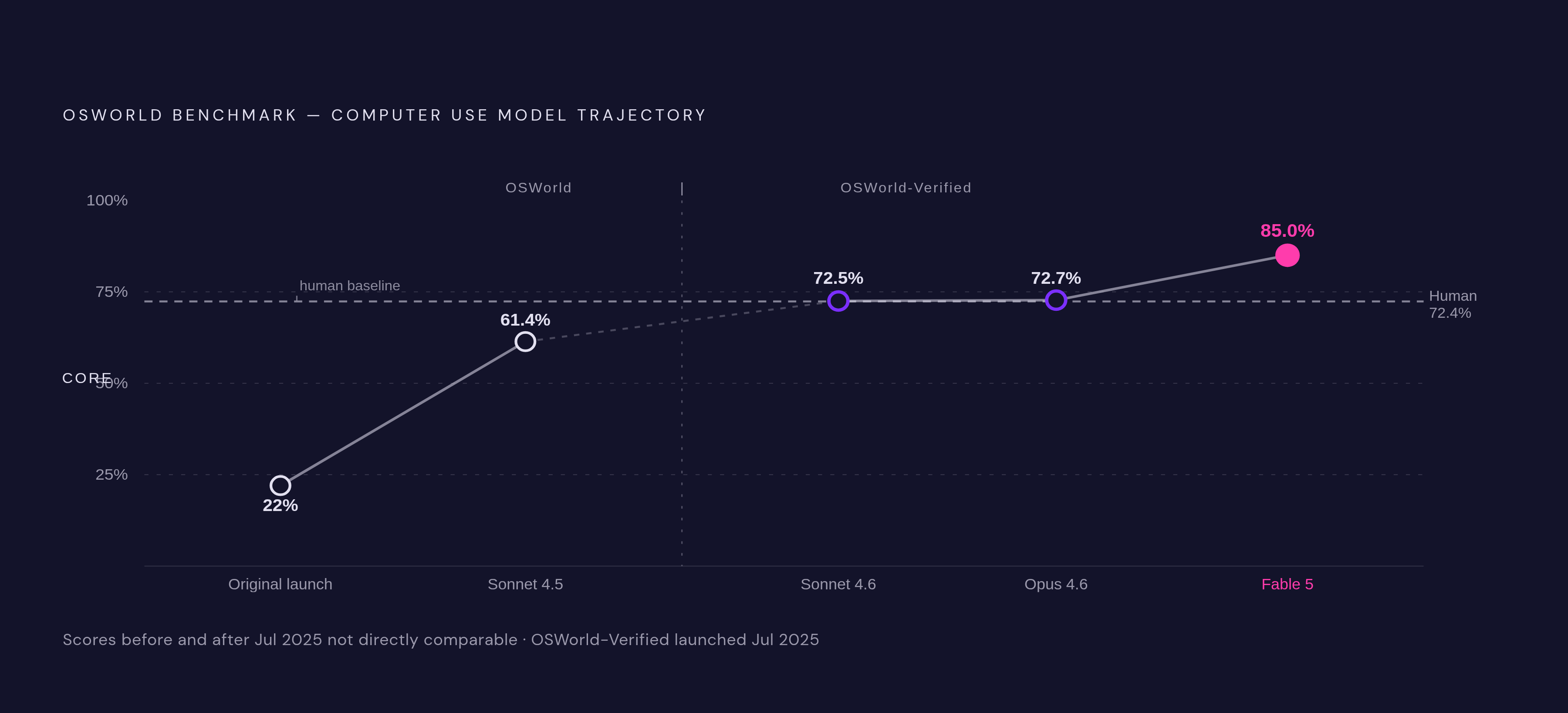
The industry uses OSWorld and its successor, OSWorld-Verified, as the reference points for judging how good a computer-use agent is. Human testers average 72.36% on the original OSWorld benchmark, which sets a bar that's grounded in what a competent person actually achieves on these tasks, not an arbitrary round number.
OSWorld-Verified arrived in July 2025 as an update to the same benchmark. Task quality, evaluation grading, and infrastructure all got revised, so a score from before July 2025 and a score from after it aren't directly comparable unless you note which version produced them. That distinction matters for anyone trying to chart progress honestly.
The trajectory across model generations tells the real story. The original model at launch in October 2024 scored 22% on OSWorld: experimental, and nowhere near production-ready. Claude Sonnet 4.5 scored 61.4% on OSWorld, a meaningful jump but still short of the human baseline. Claude Sonnet 4.6 hit 72.5% on OSWorld-Verified, crossing that human baseline for the first time. Claude Opus 4.6 landed at 72.7%, effectively at parity with human performance. And Claude Fable 5 currently is 85.00 on OSWorld-Verified, the state of the art on this measure as of writing.
That arc, from 22% to 85.00, is the argument for why GA happened now rather than a year earlier. A tool too unreliable to trust with real screens in 2024 is now measurably better than the average human tester at the tasks the benchmark tests.
What production adoption looks like across industries
Adoption followed the benchmark curve almost exactly. Late 2024 use cases were exploratory, mostly proof-of-concept work at companies willing to tolerate failure. By late 2025, computer use was running inside production systems at major customers. The loop had moved steadily from early proof-of-concept work toward broader deployment across more varied workflows.
Healthcare and insurance claims processing is one of the clearer wins, precisely because so much of that infrastructure has no API to build against. Legacy claims systems, many of them decades old, only expose a screen. Agents built on computer use work inside those systems the same way a human claims processor would, and the longest workflow measured dropped from 32 minutes down to 13. Completion rate held at 100%, with no changes made to the prompts driving the agent. The results were documented as part of Anthropic's published account of the workflow.
Box built a different kind of workflow using the Skills API rather than computer use directly: specialized document creation inside Box Agent. For one banking client, a Skill captures the bank's credit methodology and its approved memo format, and Box Agent applies that Skill to financial statements and deal documents already sitting in Box, producing a credit memo that's grounded in the source documents and ready for an analyst to review. Matthew Midson, Managing Director of Banking, is credited with describing the workflow.
The RPA industry took notice early. Asana, Canva, Cognition, DoorDash, Replit, and The Browser Company were all cited as early explorers of computer use back at the original 2024 launch. UiPath went further in May 2026, opening its enterprise platform to coding agents including Claude Code, with policy enforcement, audit trails, credential vaults, and role-based access control built around the integration. An RPA vendor built around scripted automation is now wiring in an agent that reasons over screenshots, rather than treating the two approaches as competitors.
Cost structure and session constraints to plan around
Billing runs on tokens, and screenshot frequency drives the bill more than almost anything else, since every screenshot requires vision processing tokens on top of whatever text is being generated. A basic task run through the API costs roughly $0.30 and takes one to two minutes, which is a reasonable planning baseline for simple, well-scoped work.
Prompt caching, an Anthropic beta feature, cuts costs by around 40% in summarization workflows where the same system prompt gets reused across calls. That's a meaningful saving for any pipeline running the same instructions against different documents repeatedly.
Three constraints shape how anyone designs around this at scale beyond the per-task cost: Long autonomous sessions need to be broken into resumable chunks rather than one continuous connection, since extended runs can be interrupted by connection timeouts. Per-step latency, driven by screenshot round-trips and reasoning passes, rules out this tool for anything needing near-instant response times, chat interfaces and real-time UI feedback among them. And response handling shapes how a front end has to manage output as it arrives rather than waiting for a complete response.
Security risks that scale with OS-level access
Prompt injection is the threat that matters most here, and it matters more for computer use than for a text-only model because the blast radius includes an entire operating system. Malicious instructions hidden inside a webpage, an email, or a document that Claude encounters mid-task can get interpreted as legitimate commands and executed, the same as any instruction from the actual user. Anthropic's own safety evaluations show Sonnet 4.6 as a real improvement over Sonnet 4.5 on this front, performing close to Opus 4.6 on the relevant safety measures, but "improved" isn't the same as "immune."
There's already a real-world case establishing what happens when this goes wrong. A Russian-speaking actor injected malicious instructions into an AI vendor's evaluation sandbox and walked away with production API keys, hitting roughly 30 AI companies in about four days. The stated goal, reportedly a pre-release Claude model, wasn't reached, and Anthropic's own systems weren't compromised in the incident. But the attack pattern, using a sandboxed evaluation environment as the entry point, is exactly the kind of thing computer use makes newly possible at scale, since the whole point of the tool is granting an agent access to environments a script could never reach on its own.
Credential theft has a documented price tag attached to it already, even outside this specific tool. Sysdig documented a pattern it called "LLMjacking," where stolen credentials tied to AI services get resold or abused, and estimated the cost to a single victim can exceed $46,000. That number predates the GA release, but it's the right order of magnitude to keep in mind for anyone weighing how much unrestricted OS-level access an agent should actually get.
Anthropic's own guidance is direct about where the real defense has to sit. Computer use should run inside virtual machines, Docker containers, or dedicated machines with no access to sensitive data, full stop. Claude's built-in safety behaviors are worth having as a second layer, but they aren't the primary control once an agent has OS-level reach. The primary control has to be structural: isolate the environment before the agent ever gets a screenshot, so that a successful injection has nothing valuable to reach.
Current limitations affecting production design
Native desktop computer use was macOS-only as of March 2026, with Windows support arriving shortly after, about ten days later. For enterprises running Windows-primary fleets, which is most large enterprises, that gap set a hard constraint on rollout timing that had nothing to do with model capability and everything to do with platform support catching up.
Speed is a limitation baked into the design, not a bug that will get patched away. Screen navigation, by its nature, is slower than a direct API integration, since every step requires a screenshot round-trip and a reasoning pass before an action fires. Wherever the target application already offers a native connector, that connector will outperform computer use on latency and reliability both. Computer use exists for the cases with no connector to reach for.
Multi-step reliability still needs guardrails around it, particularly in workflows where the UI itself is inconsistent, dynamically rendered, or prone to layout shifts between runs. Complex tasks may need retry logic built in at the application layer rather than assuming a single pass through the loop will complete cleanly every time. That's less a flaw in the model than a reflection of what pixel-based navigation is fundamentally up against: the target software was never built to be predictable to a machine reading its screen.
Sources
- Build production agents with computer use, the Skills API, and the Files API | Claude by Anthropic
- How to Run Anthropic Computer Use Locally (2026 Guide)
- Anthropic API Use Cases: 4 Enterprise Production Workflows | Markaicode
- Computer use tool
- Introducing computer use, a new Claude 3.5 Sonnet, and Claude 3.5 Haiku
- coasty.ai